Devvio Woo Unpublished Product Notice
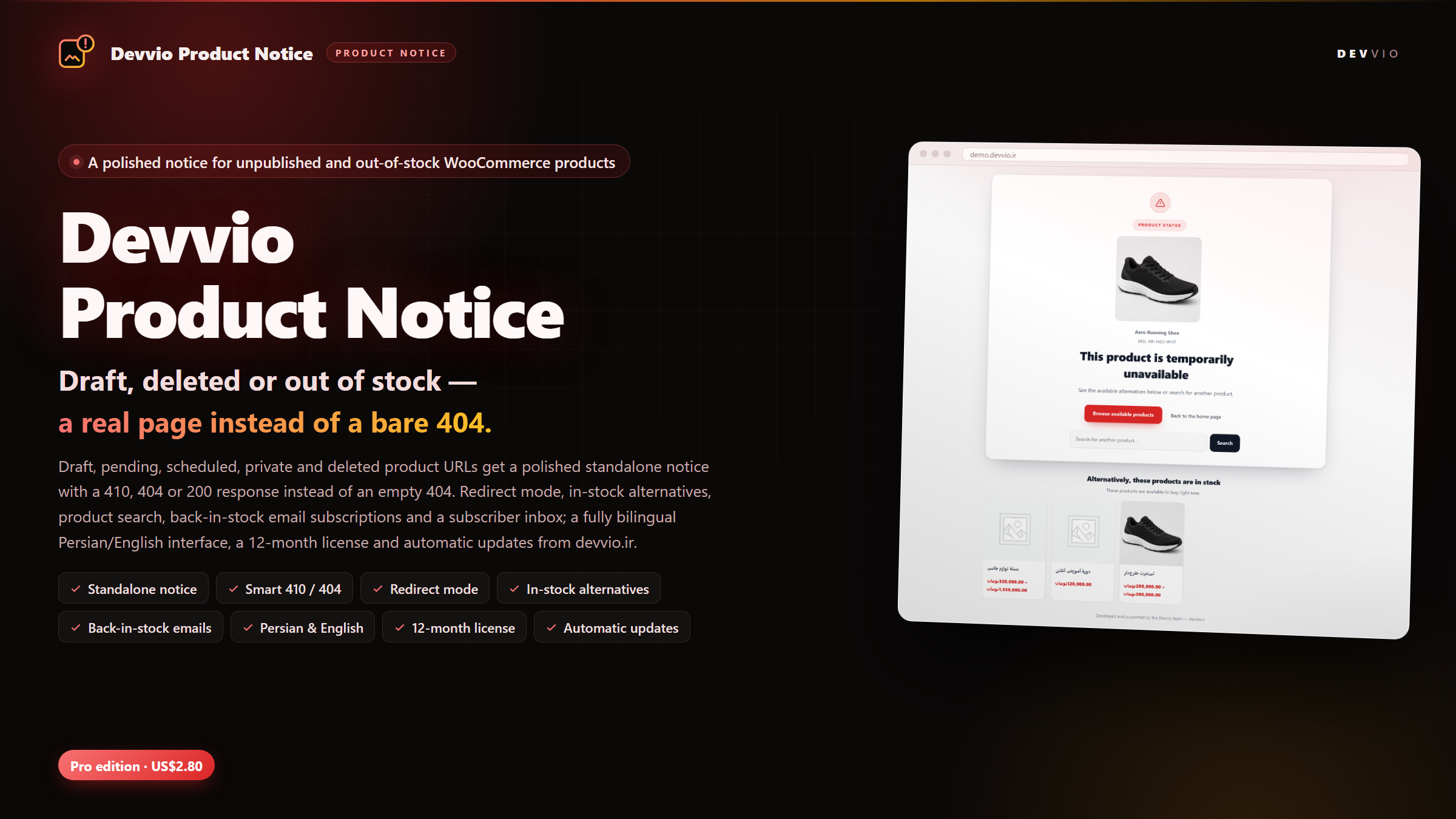
Devvio Woo Unpublished Product Notice turns the bare 404 WooCommerce leaves behind into a polished notice page: draft, pending, scheduled, private and deleted product URLs, plus published products that are temporarily out of stock. Instead of a dead end, the visitor sees the product name and image, a link back to the shop, a product search and the in-stock alternatives — and can leave an email address to be notified when the item returns. The plugin ships as a Pro edition only: US$2.80 (480,000 Toman) with a twelve-month, domain-bound license, support and automatic updates from devvio.ir. The notice and the admin panel are fully bilingual Persian/English and honour RTL and LTR per language. Developed and supported by the Devvio development team — devvio.ir . Why a bare 404 costs sales Every WooCommerce shop accumulates products that are temporarily or permanently unavailable: a draft whose preview link was shared, a seasonal item that is out of stock, or a deleted product that still shows up in Google. An empty 404 tells the customer they typed the address wrong and tells search engines the page is gone — without offering any alternative. That is a lost sale and a dent in trust, even though the same product may return or a similar one is in stock. The plugin splits the answer into three clear paths: unpublished product URLs get a dedicated notice page, published out-of-stock products show the notice in place of the purchase area, and in both cases the visitor has a way to keep shopping. A standalone notice for unpublished URLs Reliable matching, even after a slug change Matched by the current slug , the previous slug (after the permalink changed) and the product ID; the check happens before WordPress turns the URL into a 404. Supports ?p= and ?product_id= URLs and the __trashed slug variant of products in the trash. An optional switch catches missing URLs under the shop product base when a deleted product's slug no longer matches anything. Users who can edit the product keep seeing the normal WordPress preview instead of the notice (switchable), so content review is not disrupted. HTTP response and SEO Choose a 410 Gone response (recommended for removed products), 404 , or 200 for a soft-404 approach. By default the notice sends X-Robots-Tag: noindex and a robots meta tag, keeping the page out of search results. Redirect mode instead sends a 301 or 302 to any URL or to the shop page when an old address should move to a live destination. Handled URLs never override a theme template; the notice is a fast standalone page that works with block and classic themes alike. What the notice shows The product's name, image and SKU — each can be shown or hidden — so the page keeps the product's identity. Title, message and button text in Persian and English; both languages are always stored so the site stays bilingual. A custom accent colour and custom CSS to match the shop's theme. A product search form styled like the shop and in-stock alternatives with image and price (up to eight, same category first). A button back to the shop or any custom URL, and a "Developed by the Devvio team" credit in the footer. The notice on published out-of-stock products When a product is published but has no stock, its page still opens and should not look like an error. The plugin places the notice in the purchase area: Out-of-stock messages and purchase controls, including the add-to-cart button, are hidden and replaced by the notice and a "browse available products" button. The back-in-stock email form sits on the same page, so the visitor can subscribe without leaving it. In-stock alternatives appear under the notice, one tap away. The product is never reported as purchasable; the plugin also filters purchasable so other plugins cannot bring the add-to-cart button back. Back-in-stock emails Subscriptions are validated end to end: a hidden bot honeypot, a WordPress nonce, duplicate protection per product and a ceiling of 5,000 pending requests per product. Each subscriber is stored with their language and receives the email in that language. Automatic sending on restock: as soon as WooCommerce changes the stock status (simple product or variation), pending emails go out in batches of 200. A bilingual HTML email with a "View the product" button and an unsubscribe link carrying a unique per-subscriber token. A subscriber inbox in the dashboard with status counts (pending, notified, unsubscribed), filters, pagination, CSV export and per-row delete. Every request gets a short on-page message; invalid emails, duplicates and send errors each have their own message. Complete settings, no code Notice behaviour: master on/off, interface language (automatic, Persian or English) and accent colour. Unpublished URLs: statuses (draft, pending review, scheduled, private, trash), response code, notice or redirect mode, redirect code and destination, product-base coverage, noindex and editor preview. Notice content: title, message and button text in both languages, button URL and interface elements (name, image, SKU, search form). Out-of-stock products: the notice on published products, alternatives, number of suggestions (0–8) and email subscriptions. Excluded products: a list of IDs that never show the notice. Custom CSS: to make the notice look native to the shop. License, support and updates A twelve-month , domain-bound license: activate with a key, bind the installation ID, heartbeat periodically and release the site. During the term, updates arrive directly in the WordPress dashboard; each package is verified against the published size and SHA-256 , and a tampered package is never installed. After the term, the plugin and its notices keep working without restriction ; only new versions and downloads pause. Renewal costs 25% of the current price and adds twelve months from the renewal date. Support and updates are provided by the Devvio team through devvio.ir. Privacy and data Subscriber emails are stored only in the site's own database; the plugin sends no data to an external service. The only outbound requests are license and update calls to devvio.ir, carrying the domain, installation ID and versions. Deleting the plugin removes its settings, license key and subscriber table, so no personal data is left behind. Compatibility WordPress 5.8+, PHP 7.4+ and WooCommerce 5.0+ (tested up to WooCommerce 11.2.1). Declared compatible with High-Performance Order Storage (HPOS) and the Cart/Checkout blocks. Block and classic themes; RTL and LTR layouts for Persian and English. No external dependency: notices and email run on WordPress and WooCommerce themselves. Install and first run After purchase, download the Pro ZIP from your devvio.ir account. In the WordPress dashboard go to Plugins → Add New → Upload Plugin , choose the ZIP and install it. Activate the plugin; the Product Notice page appears in the admin menu. Open the License tab, enter your twelve-month key and activate it. On the Settings tab, choose the statuses, response code, bilingual content and accent colour. Open a draft product URL in a logged-out window to see the notice exactly as a customer would. Built by Devvio Like every Devvio product, this plugin is designed, developed, tested and supported by the Devvio development team . The twelve-month license includes support and updates; afterwards it renews at 25% of the current price. Official store: devvio.ir .
Frequently asked questions
What does Devvio Woo Unpublished Product Notice do?
It turns unpublished product URLs (draft, pending review, scheduled, private and deleted) into a dedicated notice page instead of a bare 404, and on published out-of-stock products it replaces the purchase area with a notice and a back-in-stock email form. The notice shows the product name and image, a link back to the shop, a product search and the in-stock alternatives. Version 2.0.0 ships as a Pro edition only.
Which product statuses are covered?
Draft, pending review, scheduled, private and trash — each can be enabled or disabled individually. Published products that are out of stock are handled separately. The settings page lets you choose exactly which statuses receive the notice.
Can I choose the HTTP status code? How does it affect SEO?
Yes. You can return 410 Gone (recommended for removed products), 404 or 200. By default the notice sends an X-Robots-Tag header and a robots meta tag with noindex so the page stays out of search results. If an old address should move to a live page, redirect mode sends a 301 or 302 to any URL instead.
Does it work on published products that are out of stock?
Yes. On a published out-of-stock product page the notice takes the place of the purchase area: the out-of-stock message and add-to-cart button are hidden, the back-in-stock email form and the in-stock alternatives are shown, and the product is never reported as purchasable so no other plugin can bring the add-to-cart button back.
How are the alternative products chosen?
The plugin picks the newest published in-stock products, same category first and the whole shop as a fallback. The number of suggestions is configurable from 0 to 8 (4 by default) and each card shows the image and price. Excluded products and the original product never appear in the list.
How are the back-in-stock emails sent?
The customer enters an email on the same page; the request is protected by a WordPress nonce, a bot honeypot and duplicate protection. As soon as WooCommerce changes the stock status of the product or variation to in stock, pending emails go out in batches of 200 through wp_mail. Every email is written in the subscriber's own language and carries an unsubscribe link with a unique token.
Is the subscription double opt-in?
No. The email is stored without a confirmation message so the visitor gets instant feedback; bots are handled with the hidden honeypot, the nonce and a request ceiling. The subscriber only receives an email when the product is restocked, and that email contains the unsubscribe link.
Is the interface available in Persian? What happens on an English site?
The notice and the admin panel are fully bilingual Persian/English. You can set the language to automatic, Persian or English; automatic follows the site and user language. Both content languages are always stored, and RTL or LTR direction is applied per language — even on a Persian site that shows the English notice.
What happens when the license expires, and how much is renewal?
After the twelve-month term the plugin and its notices keep working without restriction; only new versions and downloads pause. Renewal costs 25% of the plugin's current price and adds twelve months from the renewal date. The license is domain-bound and managed with a key, an installation ID and a heartbeat.
Where do updates come from, and how is a package verified?
Updates are offered in the WordPress dashboard from devvio.ir and install with one click. Before installing, each package is checked against the published size and SHA-256 hash, so a truncated or tampered package is never installed. After the license expires, updates pause until renewal.
What are the requirements and compatibility?
WordPress 5.8+, PHP 7.4+ and WooCommerce 5.0+ (tested up to WooCommerce 11.2.1). The plugin declares compatibility with High-Performance Order Storage (HPOS) and the Cart/Checkout blocks, works with block and classic themes, and needs no external service other than devvio.ir for licensing and updates.
Can I exclude a product or redirect instead of showing the notice?
Yes. The settings include a list of excluded product IDs that never show the notice. The response mode has two options: show the notice page, or redirect with a 301/302 to any URL or to the shop page.
Where are subscriber emails stored, and what happens if I delete the plugin?
Emails are stored only in the plugin's own table in your site's database and are never sent to an external service. Deleting the plugin from the dashboard removes its settings, license key and subscriber table, so no personal data is left behind.
How much does the plugin cost, and which editions are available?
There is one edition: Pro, at US$2.80 (480,000 Toman), including a twelve-month license, support and automatic updates from devvio.ir. Renewal costs 25% of the current price. Purchase and download happen from your devvio.ir account.
Select edition