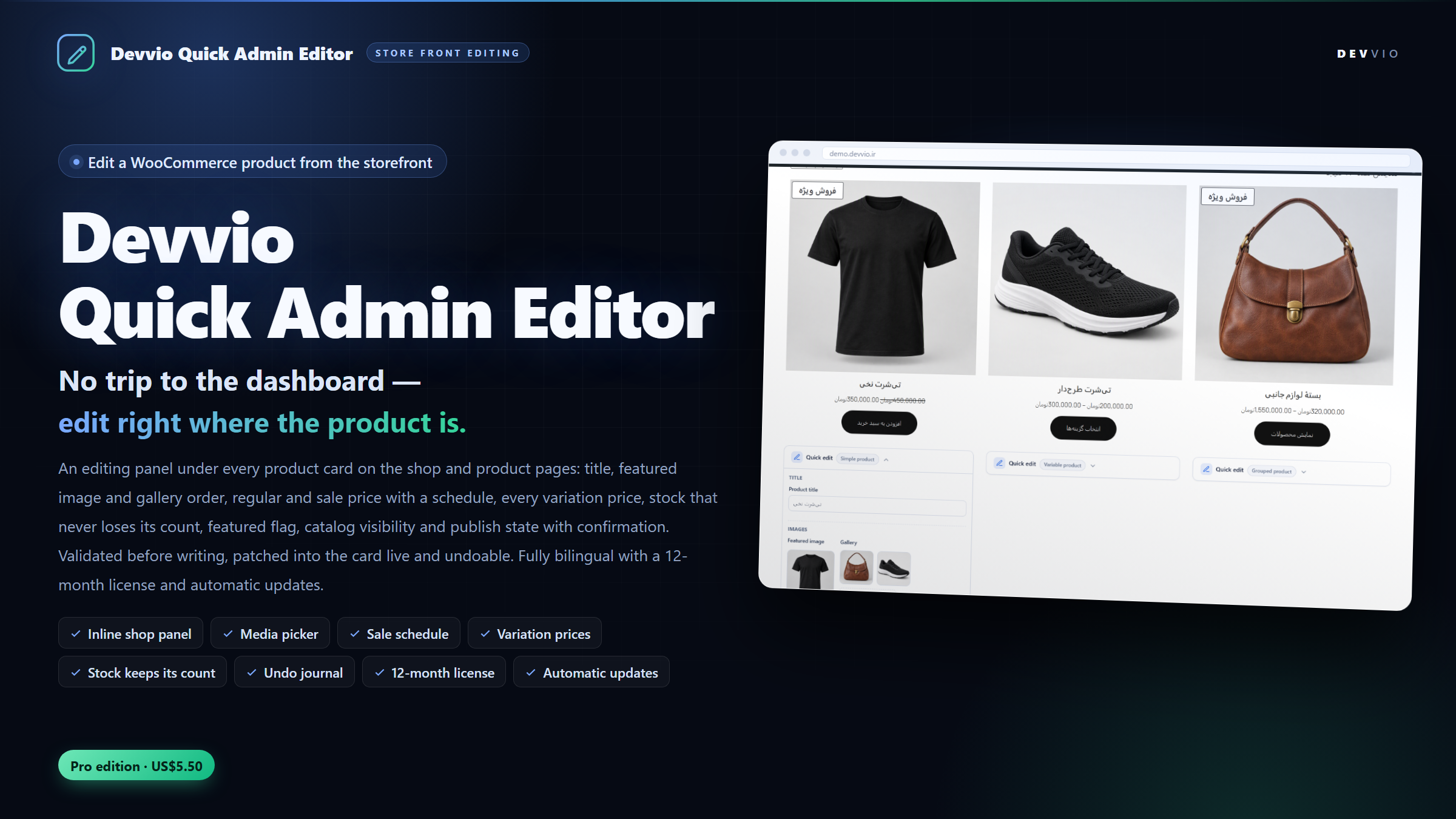
Devvio Quick Admin Editor
Devvio Quick Admin Editor Pro is a WordPress and WooCommerce plugin that brings product editing onto the storefront: under the very card your customer sees, you change the featured image and gallery order, the regular and sale price with its schedule, every variation's price, stock status and quantity, the title, the featured flag, catalog visibility and publish state — without opening the dashboard, without loading the product screen and without losing your scroll position. Every change is validated before it is written, saved through WooCommerce itself, patched into the product card instantly and recorded in that product's undo journal. The plugin ships as a single Pro edition and its panel requires an active devvio.ir license for this site. The panel, its settings and its validation messages are fully Persian and English with right-to-left and left-to-right layouts. Why edit from the shop? The WordPress product list makes you hunt for a row, open a screen, find the right tab, change a value, hit update, then go back to the storefront to see the result. When the task is "fix this product's price", "swap the main image" or "take this item out of stock", that path is long and mistakes are expensive. This plugin puts the controls where you see the outcome; each panel section saves on its own, and the product card in the shop grid is patched in place without a page reload. What the panel does Images: featured, gallery and order Replace the featured image from the media library, or star any gallery image to promote it to featured — the previous star is removed automatically. Add images from the library, upload from your computer, or drop files straight onto the image grid; pick several at once and add them in the order you chose. Reorder the gallery by drag and drop or with the arrow keys; the order you leave is the order the product page shows. Remove an image from the gallery — the file stays in the library, only its link is dropped. Before writing, the plugin checks that the submitted id really is an existing image attachment; a video, a trashed post or an arbitrary id never reaches _thumbnail_id or _product_image_gallery . Prices and the sale schedule Regular and sale price with currency-aware validation; a sale price equal to or higher than the regular price is rejected and the regular price is quoted back to you. Emptying the sale field also clears the sale schedule, so a product never keeps dates it no longer uses. The schedule takes two date fields, or a date with a clock time, resolved in the site's own timezone ; a day-only value ends at 23:59:59, an inverted range is refused, and a schedule cannot exist without a regular price. Every variation price, in one safe batch A variable product is edited row by row in one table: each variation, its current regular and sale price, and its stock flag. The whole batch is validated first; one bad row can never leave half the variations written and half untouched — it is all or nothing. After saving, WooCommerce itself re-syncs the parent's price range, stock status and total quantity so the shop card never shows a stale range. Stock without losing the number Three states — in stock, on backorder, out of stock — plus the quantity. When you take a product out of stock the quantity is not destroyed: the plugin parks the value and the backorder flag, then brings them back when the product is in stock again — working around WooCommerce recalculating the status from the quantity. If a zero quantity meets the "in stock" status, the panel answers with a clear note instead of a silent no-change. Title, featured, catalog and publish state Rename the product right there; the slug and permalink stay untouched. Toggle the featured flag and choose catalog visibility: everywhere, catalog only, search only or hidden. Switch the status between draft, pending review, private and published; leaving "published" asks for confirmation first and reminds you the change is undoable. Undo: each product keeps its own journal Each panel keeps a journal of the latest changes of that product (1 to 30 entries, in product meta). The journal is not in the browser, so it is still there tomorrow or when another editor opens the product. One click restores the previous state — the full gallery, the whole variation price set or the whole stock tree — and if a restore cannot be applied, the entry stays in the journal so you can try again. The journal and its depth can be switched off in the settings; an existing journal is kept until the plugin is removed with the delete-data option ticked. A live product card, no reload After each change the section is re-rendered on the server and the product card in the grid is patched in place: price, sale badge, thumbnail, stock and status. The page does not reload, your scroll position survives and the shop's filters stay as they were. The media picker, without the heavy WordPress modal The picker is a plain, accessible modal that talks to the REST API: library search, 24 images per page, selection in your preferred order, fresh file uploads and drag-and-drop onto the grid. Nothing loads from wp.media — no media-views stylesheet, no underscore/lodash shim, no print templates — which is why a page carrying the panel loads only jQuery and one small stylesheet. On mobile the same modal opens as a bottom sheet. Panel behaviour that stays out of the way Only fields you actually touched are sent; an input that was merely focused and blurred sends nothing. Save on blur (the default) or one explicit save button per section, whichever your team prefers. Panels can start collapsed, so the shop shows only the header bar. The WordPress admin bar carries a per-user Hide the quick editor / Show the quick editor switch; an editor can browse the storefront exactly as a customer without disabling the plugin for everyone. The panel is rendered only for a logged-in user holding the capability you picked, and never on the cart, checkout or account screens. Security and data integrity One mutation layer ( WQAE_Writers ) validates the whole request before a single row is written: numbers, dates, ownership of a variation, and whether an id really is an image. Every panel carries its own nonce, every AJAX action and REST route re-checks the capability chosen in the settings, and a panel whose product changed underneath it is rejected with a readable "reload the page" message instead of writing stale data. All writes pass through the WooCommerce CRUD object, so the value in the database and the wp-admin product screen is exactly the same, and the price and stock caches are cleared after each write. Works with every product type Simple products: every section. Variable products: the variation price table plus the stock section; the parent's price, status and total quantity are re-synced after saving. Grouped products: no price or stock section, because their price comes from the items they group. External products: button text and price, without stock. Downloadable products: edited like simple products. Anything that does not apply is not rendered, rather than shown and refused. License, updates and support This is a single-edition Pro product: an annual, domain-bound license with twelve months of updates and support for one site. When the year is over, everything you installed keeps working — the storefront panels stay live; only new downloads and the automatic update pause. Renewal costs 25% of the current price and adds twelve months measured from the later of the renewal date and the expiry date, so renewing early loses nothing. The plugins screen checks https://devvio.ir/api/updates/check twice a day, shows the changelog from the version feed and installs the package that matches your edition. Every download is verified against the published file size and SHA-256 hash before anything is replaced, and an update never switches your edition. Activation, heartbeat and release run over HTTPS against /api/plugin/* , and the state is bound to the key, the site identity and a stable installation id. Installation and first steps In WordPress admin go to Plugins → Add New → Upload Plugin , choose devvio-wc-quick-admin-editor-3.0.0-pro.zip , then install and activate. WooCommerce must be installed and active; otherwise the plugin only shows a notice and never touches the store. Open the License tab of the plugin screen, paste the key you received from devvio.ir and activate it. Until the key is verified for this site the storefront panels stay hidden. Open WooCommerce → Quick Admin Editor → Guide for the five-minute walkthrough, then visit the shop as an editor: the Quick edit bar sits under every product card. On the Settings tab choose the allowed role, the sections that role sees, and whether fields save on blur. Shop managers can save these settings without being given manage_options . Minimum requirements WordPress 5.8 or newer, PHP 7.4 or newer and WooCommerce 6.0 or newer. Version 3.0.0 is tested with WordPress 7.1 and WooCommerce 11.2. Development and support This plugin is built and supported by the Devvio development team and is published together with the devvio.ir license and update system. Product page, pricing, version history and support: devvio.ir/products/devvio-wc-quick-admin-editor
Frequently asked questions
What does Devvio Quick Admin Editor Pro do?
It brings product editing from the dashboard onto the storefront itself: under every product card you change the featured image and gallery order, the regular and sale price with its schedule, every variation's price, stock status and quantity, the title, the featured flag, catalog visibility and publish state without opening the product screen. Every change is validated before it is written, saved through WooCommerce CRUD, patched into the product card live and recorded in that product's undo journal. Version 3.0.0 ships as a Pro-only edition.
Will my customers see the panel?
No. The panel is rendered only for a logged-in user holding the capability picked in the settings (shop manager, editor or administrators only), and never on the cart, checkout or account screens. The admin bar also carries a per-user 'hide the quick editor' switch, so you can browse the storefront exactly as a customer without disabling the plugin for everyone.
Does it only change a front-end copy of the product data?
No, the real data is written. Every action goes through the WooCommerce CRUD object, so the same value lands in the database, in the wp-admin product screen and in any other integration. The plugin clears the WooCommerce price and stock caches after each write.
Is there a Free edition?
No. Quick Admin Editor is a single Pro edition, because the whole point of the plugin - editing live product data from the storefront - is exactly what the license covers. One twelve-month license covers one site, including updates and support.
What happens when my twelve months are over?
Everything you installed keeps working, including the storefront panels. Only new downloads and the automatic update pause. Renewing costs 25% of the current plugin price and adds twelve months measured from the later of the renewal date and the expiry date.
Can I undo after closing the tab?
Yes. The undo journal lives in the product's own meta, not in the browser, so the restore button is waiting whenever you or another editor opens that product again. The depth is configurable from 1 to 30 changes per product, and the journal itself can be switched off; an existing journal is kept until the plugin is removed with the delete-data option ticked.
How are variable products edited?
Each variation's price is edited row by row in one table, and the whole batch is validated before anything is written; one bad row can never leave the rest half-saved. The stock section applies to every variation, and after saving WooCommerce re-syncs the parent's price range, stock status and total quantity so the shop card never shows a stale range.
What do grouped, external and downloadable products show?
Grouped products get no price or stock section because their price comes from the items they group; external products get their button text and price but no stock; downloadable products are edited like simple products. Anything that does not apply is not rendered, rather than shown and refused.
Does the media picker need the WordPress media library scripts?
No. The picker is a plain, accessible modal that reads from the REST API, searches and pages the library, uploads new files and accepts drag-and-drop. Nothing from wp.media is loaded; that is why a page carrying the panel loads only jQuery and one small stylesheet. On mobile the same modal opens as a bottom sheet.
Does an editor writing prices need manage_options?
No. The capability is one of three choices in the settings (manage_woocommerce, edit_posts, or manage_options for administrators only) and can be filtered with wqae_capability. Shop managers can save the plugin settings without being given manage_options. Logged-out visitors never get a panel, a script or a working endpoint.
What is deleted on uninstall?
Nothing by default, so a reinstall picks up where you left. If you tick 'Delete settings, license and history on uninstall' first, the plugin removes its own option, the license state, the hidden-panel user meta, the update caches and the _wqae_ product meta; meta left by builds older than 3.0.0 is cleaned too.
What are the minimum requirements?
WordPress 5.8 or newer, PHP 7.4 or newer and an active WooCommerce 6.0 or newer. Version 3.0.0 is tested with WordPress 7.1 and WooCommerce 11.2, and is built and supported by the Devvio development team.
Select edition