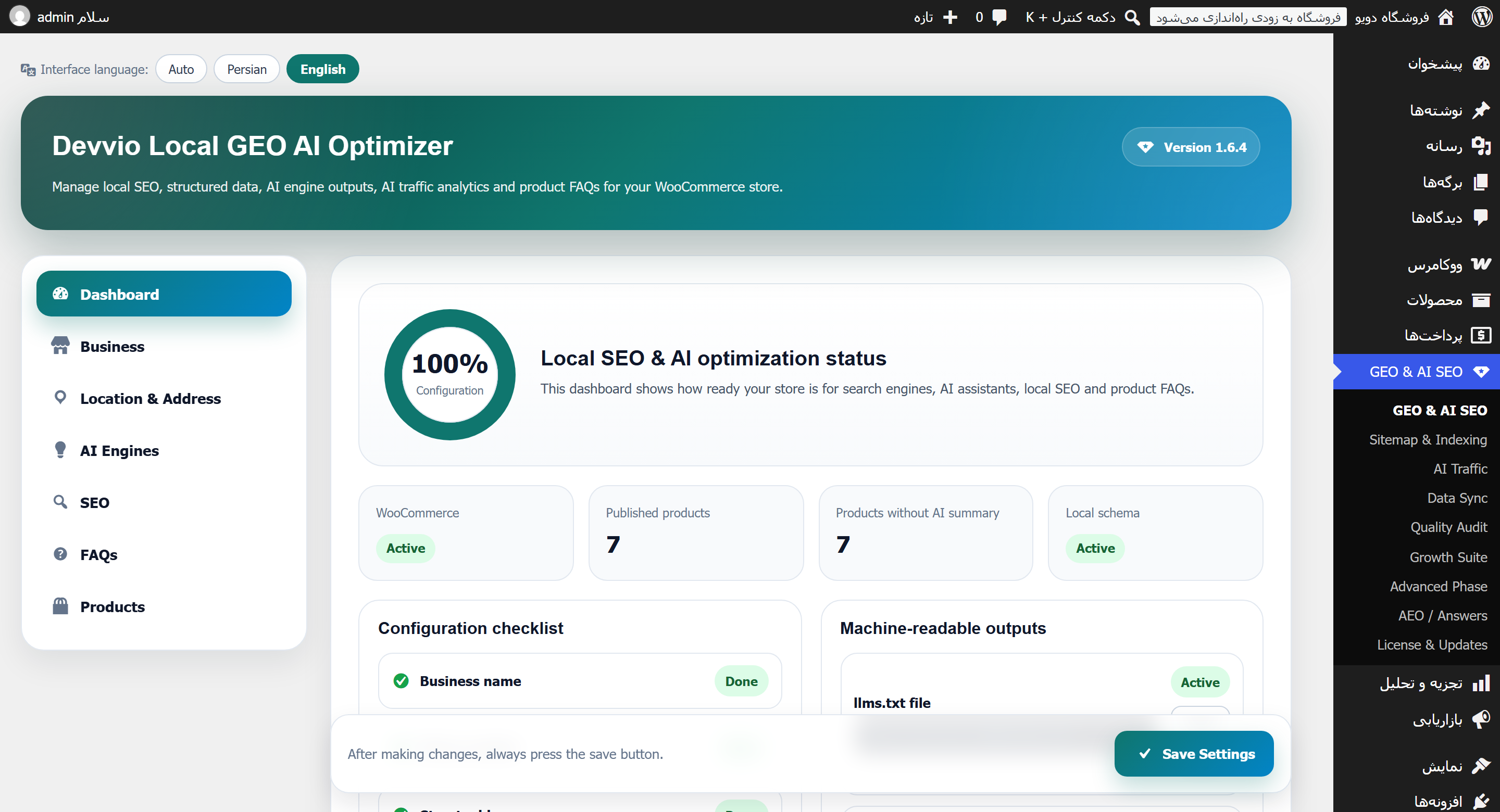
Devvio Local GEO AI Optimizer
Devvio Local GEO AI Optimizer is a WordPress and WooCommerce plugin that makes your store readable and citable by both classic search engines and AI answer engines (ChatGPT, Perplexity, Claude, Gemini, Copilot and Google AI Overviews): from llms.txt and robots.txt rules for AI crawlers to one unified store schema, a Google Merchant feed, AI referral analytics and a direct-answer layer. Version 1.6.0 ships in two editions: Free (the complete local-SEO and GEO foundation) and Pro with every AI tool, priced at US$6.50 (1,250,000 Toman for buyers in Iran). The admin UI is fully bilingual English/Persian with automatic right-to-left layout. The free edition needs no license key and is updated forever; in Pro, when the 12-month term ends the plugin and all of its features keep working and only new downloads pause until you renew. Who is it for? A WooCommerce store that wants to be quotable when someone asks ChatGPT or Perplexity "what is the best … to buy". A site whose Product schema is incomplete: GTIN, brand, warranty, delivery time, service area and stock never reach Google or the AI engines properly. A local business with an address, opening hours and coordinates but no correct LocalBusiness schema. An owner who wants to know how many visits come from answer engines and how often AI crawlers show up. A site already running Yoast or Rank Math that only needs the GEO layer, llms.txt and a serious XML sitemap without conflicts. A large catalogue whose sitemap times out and needs an index plus children, a file cache and a validator. A team that bulk-fixes product data with a JSON, XML or PHP script and wants it to be reversible. The GEO and SEO layer 📄 llms.txt and llms-full.txt Two standard files for language models: a structured summary of the site, its key sections, important links, the store's core facts and the Q&A list. Both are cached and purged automatically on every product change, and served with DONOTCACHEPAGE so a page cache can never replay them as HTML. 🤖 robots.txt rules for AI crawlers More than 30 known agents are addressed by their real tokens (GPTBot, OAI-SearchBot, ChatGPT-User, ClaudeBot, Claude-User, anthropic-ai, PerplexityBot, Perplexity-User, Google-Extended, GoogleOther, Amazonbot, Applebot, FacebookBot, meta-externalagent, Bytespider, DuckAssistBot, cohere-ai, CCBot, Diffbot, YouBot, MistralAI-User and more). WooCommerce paths are disallowed with their real slugs and a trailing slash, so /cart cannot accidentally block /cartoon-dresses . 🧩 One JSON-LD graph, no duplicates Every node (LocalBusiness, Organization, WebSite, WebPage, BreadcrumbList, FAQPage, HowTo, ItemList and Product) is merged into a single @graph document keyed by @id , and WooCommerce's duplicate WebSite/BreadcrumbList nodes are suppressed. No more "Duplicate entity" in Search Console, and no two conflicting versions of the same entity for an answer engine to choose between. The Product schema carries Brand, GTIN (gtin8/gtin13/gtin14), MPN, properties, Place and an Offer with availableAtOrFrom , warranty, delivery lead time, area served and a valid-through date for sale prices; currency is emitted with the correct ISO 4217 code. 🗺️ Sitemap and indexing The plugin serves /sitemap.xml (index) plus /sitemap-{type}-{n}.xml children and can take over the WordPress core sitemap — unless Yoast, Rank Math, SEOPress or AIOSEO owns it, in which case it steps aside. Image sitemaps (featured image, product gallery, in-content images) with title and caption, lastmod , changefreq , per-type priority, exclusion of noindex, password-protected, hidden and out-of-stock content, plus manual IDs and URL patterns. Validator: fetches the live sitemap, walks the children and audits sampled URLs for status code, redirects, robots.txt blocking, canonical mismatch, noindex leaks, duplicates and protocol limits — each finding with a one-click repair. URL checker: a batched HEAD walk over the whole sitemap with progress and a broken-URL list; "auto-exclude broken" moves them into the exclusion list. IndexNow: key file served at /lgio-indexnow-<key>.txt , manual submission of up to 10,000 URLs and throttled automatic submission of newly published URLs (Google retired sitemap pings in 2023). Direct SQL queries so a 50,000-product shop never times out, with a file cache and configurable TTL invalidated on every content change. 🔍 Full SEO Title and meta-description templates with %%title%% , %%sep%% , %%sitename%% and %%excerpt%% ; a per-product/page/post SEO box (title, description, canonical, OG image, noindex); complete Open Graph with og:image:width/height/alt , Twitter cards, product:price:* and article published/modified times; automatic noindex for cart, checkout, my-account and search. When another SEO plugin is active this plugin's head output disables itself so no tags are duplicated — schema, product markup, llms.txt, feeds and analytics keep working. ❓ FAQs In the free edition you author Q&A pairs on each product yourself; they render as native <details> elements (zero JavaScript) with both microdata and FAQPage JSON-LD. 🌐 Public REST API /wp-json/lgio/v1/local-info , /wp-json/lgio/v1/products and /wp-json/lgio/v1/product/{id}/ai-summary let agents and external services read your store data. What Pro adds 📊 AI traffic analytics Two streams are counted: referrals from answer engines matched against a curated referer-domain map (ChatGPT, Perplexity, Claude, Gemini, Copilot, DeepSeek, Grok, Meta AI, You.com, Phind, Poe, HuggingChat, Le Chat, Kagi, Kimi, Qwen and more) and AI crawler hits by user agent, per bot and per day. The dashboard shows a daily trend chart (server-side SVG, no JS), a per-engine table, top landing pages and CSV export. Normal visitors cost a single in-memory lookup; only AI hits touch the database with one deduplicated upsert. ✨ AI content generation Per-product summaries and FAQs through OpenAI-compatible, Anthropic or Gemini endpoints (proxy gateways supported, reasoning models handled — o-series and gpt-5 need max_completion_tokens ). Output language is configurable: follow the site language, force Persian or force English. Bulk generation, AI image alt-text and content suggestions live on the same path. ✅ Quality audit Scores each product for SEO/AI readiness, lists the concrete issues, adds a score column to the product list and runs bulk actions on your selection — so you know which 20 products to fix first. 🔁 Data sync Paste one JSON, XML or PHP script and update product data in bulk: price, stock, texts, GTIN/MPN, warranty, delivery, AI summary, FAQs, SEO fields, categories, tags and attributes. Only the fields present in the payload are touched; everything else is skipped and reported, and unknown fields are skipped with a warning. Automatic field detection with include/exclude checkboxes: after pasting, every detected field is listed once with per-field product counts and bilingual labels; uncheck it and that field is left untouched for every product in the script. Product search filters on the Sample scripts tab: FAQ empty/filled, AI summary, GTIN, MPN, warranty, delivery time, SEO title and description, descriptions, price, SKU, weight, categories, tags, attributes and variations, plus product type, publish status, stock status, on-sale and category. Dry-run preview , skip-empty mode, per-field validation and a complete import log. Sample script generator: raw JSON/XML/PHP templates, a ready AI instruction prompt and per-product payloads pre-filled from current data; "All products" combines up to 200 products into one script. Creating products that do not exist yet, with an explicit opt-in and a default draft or publish status. 💬 Answer Engine Optimization (AEO) Search is no longer ten blue links: answer engines quote a sentence , not a page. This module makes the store quotable — a hand-written or AI-generated direct answer (TL;DR) per post, page or product, rendered above the content with inline CSS only (no extra request, no JavaScript) and marked up as abstract plus speakable ; Q&A on every content type, not just products; HowTo steps; Article/BlogPosting with author, dates, word count and image; ItemList for shop and category archives; and WebSite + SearchAction . Machine-readable agent endpoints: /wp-json/lgio/v1/aeo (site summary), /answer?url=|id= (direct answer plus Q&A, HowTo, price and stock) and /faq (every published pair). llms.txt gains an "Answers" and "Key facts" layer and llms-full.txt a full Q&A dump. Per-engine allow/block policy and an optional Crawl-delay in robots.txt, plus an AEO audit scoring each URL (answer present and 15–60 words, at least three Q&A, question-style H2s, single H1, content length, lists and tables, alt coverage, internal links, schema) and a site-wide checklist — with correct Persian/Arabic word counting, since str_word_count() returns 0 for non-Latin text. 🛍️ Growth suite and advanced tools Google Merchant feed at /product-feed.xml : GTIN/MPN, brand, image, stock and sale price with an effective date; prices written as ASCII decimals (never Persian digits) and cached. Store chatbot with conversation memory, order awareness and rate limiting. A/B testing of short product descriptions with impressions and conversions counted. AI visibility lab: log the questions you test in answer engines and measure how often your store gets cited. AI usage log and reports per provider. Light, bilingual and conflict-free Yoast / Rank Math / SEOPress / AIOSEO detection switches this plugin's head output off automatically — no duplicate tags. llms.txt, llms-full.txt, the product feed and the sitemap are cached and purged on content change; admin counts use a 30-second TTL with explicit purge. CSS is written with logical properties, so one stylesheet is correct in both LTR and RTL, and code blocks stay LTR. Interface language is independent from the site language: Auto / فارسی / English, with the right direction on every plugin screen. Product meta is written through the WooCommerce API and is HPOS, blocks and product-block-editor compatible. Activation flushes rewrite rules so /llms.txt and /sitemap.xml resolve immediately — which matters on IIS and Windows Server. Free edition vs Pro Feature Free Pro LocalBusiness / Organization / WebSite / Breadcrumb schema ✔ ✔ Full Product schema (Brand, GTIN, warranty, delivery, area served) ✔ ✔ Unified JSON-LD graph with duplicate removal ✔ ✔ llms.txt and llms-full.txt ✔ ✔ robots.txt rules for 30+ AI crawlers ✔ (all allowed by default) ✔ + per-engine allow/block and Crawl-delay REST endpoints for local info and products ✔ ✔ SEO meta, title templates, Open Graph/Twitter, canonical, noindex ✔ ✔ XML sitemap + validator + URL checker + IndexNow ✔ ✔ Product FAQs authored by hand manual + AI-generated Per-product SEO and data fields ✔ ✔ Answer-engine traffic and crawler stats with CSV export — ✔ AI summaries, FAQs and image alt-text, bulk generation — ✔ Product quality audit with score column and bulk actions — ✔ JSON/XML/PHP data sync and the sample-script generator — ✔ AEO: direct answers, speakable, HowTo, ItemList, agent endpoints, audit — ✔ Google Merchant feed, chatbot, A/B tests, AI visibility lab — ✔ License key not required required (12 months, one site) Updates from devvio.ir forever during the licence term (paused after expiry until renewal) Each edition is a separate build of one codebase; do not install both at the same time. Switching editions keeps your settings and data. Installation Requirements: WordPress 6.0 or newer (tested up to 7.1), PHP 7.4 or newer and WooCommerce activated . Back up files and database, and install on a staging site first. Install the free or Pro zip from Plugins → Add New → Upload Plugin and activate it; rewrite rules are rebuilt on activation. Open the GEO & AI SEO menu and complete the Business and Location tabs (name, phone, address, coordinates, opening hours, social profiles, logo). Load /llms.txt and /sitemap.xml once in a browser and check the readiness checklist on the dashboard tab. In Pro, activate your license key for this domain under License & Updates . To use the writing tools, fill the AI Engines tab with an API key and press "test connection". Step-by-step guide 1) Business and location profile Without these two tabs the LocalBusiness schema stays incomplete and the readiness score stays low. Set the business type, phone, email, sameAs profiles, logo, full address, geo coordinates, opening hours and served area; hours become openingHoursSpecification and coordinates become geo . 2) SEO and product fields Build your title and description templates in the SEO tab, then look at the SEO box on each product edit screen: title, description, canonical, OG image and noindex. The product fields (GTIN, MPN, brand, warranty, delivery time, AI summary and FAQs) sit on the same screen. Save, reload the product page and inspect the markup. 3) llms.txt, robots and REST Keep the llms.txt and llms-full.txt toggles on. If a specific crawler should not come (for example training-only bots), set its allow/block policy on the AEO screen in Pro. The dashboard "access points" card lists the REST URLs and GEO files. 4) Sitemap and IndexNow If no other SEO plugin owns the sitemaps, enable core-sitemap takeover. After a large change press "rebuild" and then "validate", and fix each finding with its repair button. For a freshly migrated site, submitting URLs through IndexNow is faster than waiting for a crawler. 5) Connect an AI provider (Pro) Pick the provider and paste the key; for local gateways replace the Base URL with your proxy. Choose whether generated text follows the site language, Persian or English. Run the connection test and one single-product generation before any bulk job. 6) Bulk generation and quality audit (Pro) On the "Quality audit" screen, find products by filter (empty FAQ, no AI summary, missing GTIN and so on), select them and run bulk generation. The score column in the product list and the bulk actions tell you which products deserve attention first. 7) AI traffic and the AEO audit (Pro) In "AI traffic" review the daily trend, the per-engine breakdown, top landing pages and crawler hits, and export CSV. In the AEO audit, work through the per-URL score (answer length, number of Q&A, question headings, duplicate H1, alt coverage, internal links) and the site checklist in order. 8) Data sync with a script (Pro) Generate a sample script with filters, have your AI assistant fill it and paste it back into "Data sync". Always run the preview first, exclude sensitive fields with the checkboxes, then apply. A PHP payload executes code, so use only the built-in generator or a source you fully trust, as an administrator, with the confirmation checkbox ticked. License, renewal and support The Pro edition is US$6.50 for buyers outside Iran (1,250,000 Toman inside Iran). Each key covers one site for 12 months ; the plugin re-checks its status every 12 hours and "release this site" lets you move the license to a new domain. After expiry, the plugin and every Pro feature keep working — only new downloads pause, and renewal for the next year costs 25% of the current price with settings, data and history preserved. Updates arrive on the WordPress plugins screen, directly from devvio.ir. Like every Devvio product, this plugin is built and maintained by the Devvio development team , and support is provided through your devvio.ir account; when reporting an issue include your WordPress, WooCommerce and PHP versions, the plugin version and the steps to reproduce. Honest limitations The plugin cannot guarantee a citation : it produces structured data, machine-readable files and quotable answers; the decision about which source to quote stays with the AI engine. It is built around WooCommerce; without it the product sections, the Merchant feed and product FAQs have no meaning and you will see the WooCommerce requirement notice. AI writing needs your own API key and the token cost is yours; without a key those buttons do nothing (everything else works independently). AI traffic is counted from referer and user agent, so visits that arrive with no referrer or through proxies and data centres can be missed — an undercount is better than an invented number. robots.txt is a request, not a wall; a crawler that ignores it is not stopped by this file. The Google Merchant feed depends on complete product data (GTIN, brand, price, stock); items with empty fields get disapproved by Google. With non-standard page caches, flush the cache once after changing settings; the plugin sends DONOTCACHEPAGE but a custom cache may ignore it. WordPress writes no rewrite rules with the "Plain" permalink structure, so the plugin's endpoints fall back to the ?lgio-sitemap=… form and the sitemap screen shows that URL instead of claiming pretty permalinks.
Frequently asked questions
What does this plugin actually do?
It makes your WooCommerce store citable by search engines and by AI answer engines: llms.txt and llms-full.txt, robots.txt rules for more than 30 AI crawlers, one unified JSON-LD graph (LocalBusiness, Organization, WebSite, Breadcrumb, FAQ, HowTo, ItemList and a complete Product schema), SEO meta and Open Graph, a professional XML sitemap with validator and IndexNow, a Google Merchant feed, and in Pro the AI referral analytics, AI writing, quality audit, JSON/XML/PHP data sync, the AEO answer layer and a store chatbot. Version 1.6.0 is built and maintained by the Devvio development team and carries the Devvio name.
Will my store definitely show up in ChatGPT or Perplexity answers?
No plugin can promise that. What this plugin does is raise the odds: correct, non-duplicated structured data, machine-readable files for models, short quotable answers and question-style headings. The final decision about which source gets quoted is made by the AI engine. In Pro you can log the questions you test in the AI visibility lab and measure how often your store is actually cited.
What is the difference between the Free and the Pro edition?
Free includes the whole foundation: local and product schema, the unified JSON-LD graph, llms.txt and llms-full.txt, AI-crawler robots rules, SEO meta and Open Graph, the sitemap with validator, URL checker and IndexNow, the REST endpoints and hand-authored FAQs. Pro adds answer-engine traffic and crawler analytics, AI summaries/FAQs/alt-text with bulk generation, the product quality audit, bulk data sync, the AEO module with direct answers and its audit, per-crawler allow/block policy, the Google Merchant feed, the memory-aware chatbot, A/B testing and the AI visibility lab. Pro costs US$6.50 (1,250,000 Toman in Iran) with a 12-month licence for one site.
Does it conflict with Yoast, Rank Math, SEOPress or AIOSEO?
No. When one of those is detected, this plugin's head output (title, meta description, Open Graph) turns itself off so no tags are duplicated, and it will not fight over the sitemap unless you explicitly allow it. Meanwhile the product schema, llms.txt, the product feed, AI traffic stats and the GEO tools keep working — so it layers GEO on top of the SEO plugin you already use.
Will it slow my site down?
No. llms.txt, llms-full.txt, the product feed and the sitemap are cached and purged when content changes; dashboard counts use a 30-second cache with an immediate purge on product changes. For a normal visitor, detecting AI traffic is a single in-memory lookup and only AI hits issue one upsert query. The sitemap is built with direct SQL so a 50,000-product shop does not time out.
Do I need an API key for the AI writing features?
Yes. The generation tools in Pro run on your own API key and the token cost is billed by your provider. OpenAI-compatible, Anthropic and Gemini endpoints are supported, the Base URL can be changed for proxy gateways, and reasoning models (the o-series and gpt-5) are handled correctly. Output language can follow the site language, or be forced to Persian or English. Everything else in the plugin works without a key.
How do I verify that llms.txt and the sitemap are served correctly?
Open /llms.txt and /llms-full.txt in a browser, and reload llms-full.txt after changing a product to confirm the cache is purged; both are served with DONOTCACHEPAGE so a page cache cannot replay them as HTML. The real REST and GEO file URLs are listed in the access-points card on the dashboard tab. If permalinks are set to "Plain", WordPress writes no rewrite rules, so the plugin automatically uses query-based forms such as ?lgio-sitemap=index and shows that URL on the sitemap screen.
Where does the AI traffic number come from and where is it stored?
Two streams are counted: referrals from answer-engine domains (ChatGPT, Perplexity, Claude, Gemini, Copilot, DeepSeek, Grok, Meta AI, You.com, Phind, Poe, Kagi and more) matched on the referer, and AI crawler visits matched on the user agent. Data is aggregated per engine, per day and per page in the lgio_ai_traffic table — not a full visit log — and can be exported to CSV or reset from the AI traffic screen.
Is it suitable for a Persian right-to-left store?
Yes. The admin is fully bilingual and the interface language can be set to Auto, فارسی or English independently of the site language. CSS uses logical properties, so one stylesheet is correct in both directions while code blocks stay left-to-right. The AEO audit counts Persian and Arabic words properly, because str_word_count() returns zero for non-Latin text. Prices in the Google Merchant feed are always written as ASCII decimals so Persian digits cannot cause item disapprovals.
How many sites does a Pro license cover, and what happens when it expires?
Each key covers one site for 12 months, and the plugin re-checks its status with the Devvio server every 12 hours. After the term ends, the plugin and every Pro feature keep working; only new downloads pause. Paying 25% of the current price resumes downloads and support for the coming year, with settings, data and history preserved. To move a site, press "release this site" first and then activate on the new domain.
How do updates reach my site?
The plugin is connected to the devvio.ir automatic update system: a new version appears on the WordPress Plugins screen and installs from there, with no manual download. The free edition is always updated. Pro receives new versions while the license is active, and downloads stay paused during an expired term until renewal. Product news and important notices are also delivered as site-wide notifications from devvio.ir inside the plugin.
Is the data sync feature safe to run on a live store?
Only the fields present in your script are updated and everything else is left untouched; unknown fields are skipped and reported. Always run dry-run first, exclude sensitive fields with the per-field checkboxes and read the import log. JSON and XML payloads are pure data, but a PHP payload executes code — that is why it is accepted only for an administrator, with a valid nonce and an explicit confirmation checkbox, and you should take it only from the built-in generator or a source you fully trust. Back up the database before any large run on a production site.
Select edition