Devvio Badges Pro
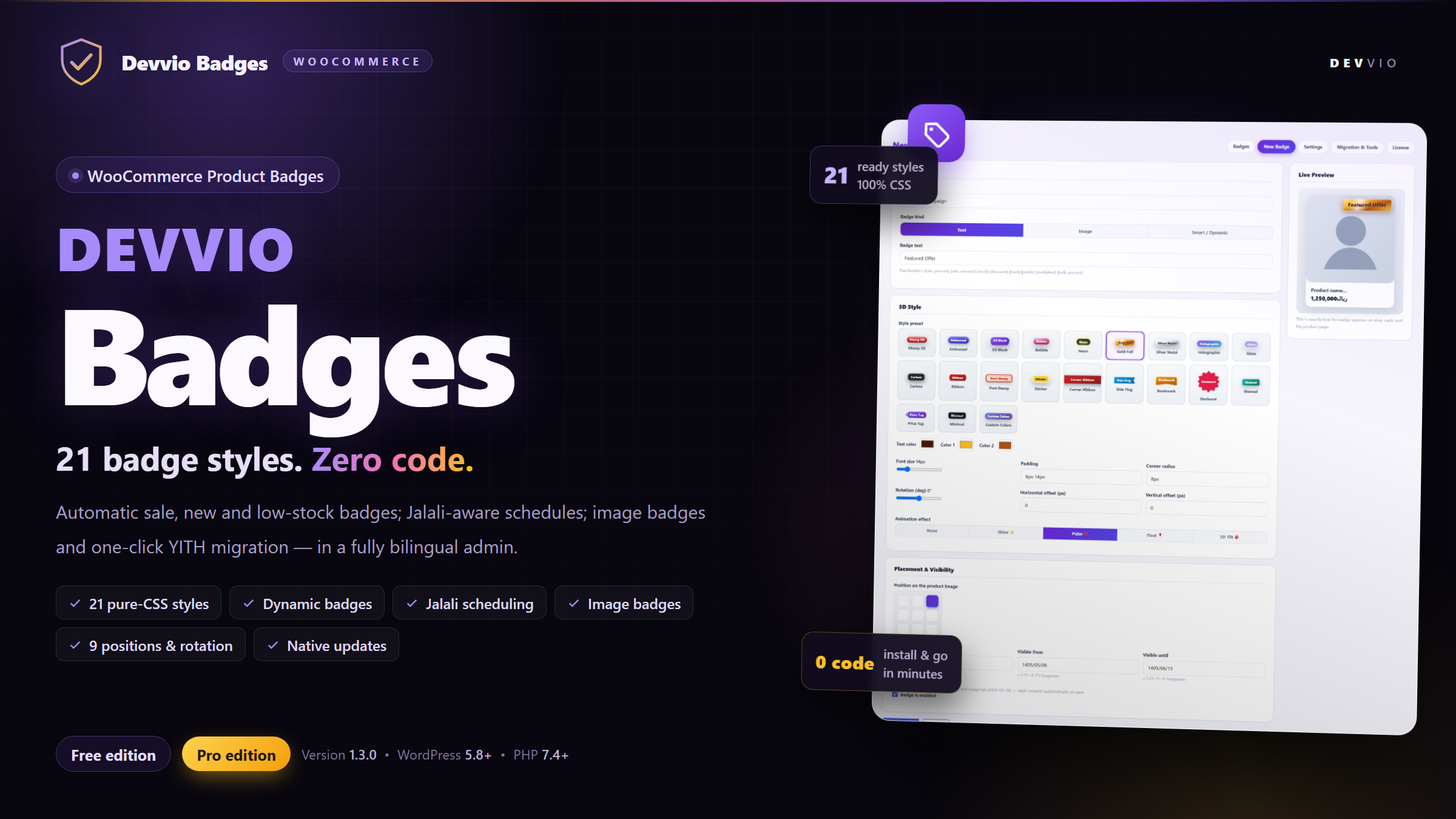
Devvio Badges 1.3.0 — three-dimensional, fully CSS product badges for WooCommerce: 21 ready styles, automatic sale / new / low-stock badges, image badges, Jalali and Gregorian scheduling, 9 positions with rotation and offsets, a live preview builder, one-click migration from YITH and automatic updates from devvio.ir — in a Free and a Pro edition. Instead of shipping badge images, the plugin draws every badge with CSS. That means the text, colour, size and placement stay editable from the dashboard, the badge stays sharp on Retina screens and the page weight is effectively zero. Badges anchor to the WooCommerce image markup, so they do not slip out of the thumbnail when you switch themes or change image dimensions. Everything runs on your own server. To check for a new release the plugin only sends its version number, the PHP and WordPress versions and your site domain to devvio.ir. No product or customer data ever leaves your site. Three badge kinds, one visual builder The "Product Badges" screen is a visual builder with a live preview. Every badge is one of three kinds: Text — anything you type, with a style, text colour, background (flat or a two-colour gradient), font size, padding and corner radius. Dynamic (automatic) — built from real WooCommerce data, for example the discount percentage, whether a product is new, or how little stock is left. Each threshold is adjustable. Image — places a PNG or SVG from your media library in place of the text (Pro). "Add badge" lets you stack up to six badges on one product and their order is the display priority. The Free edition shows one badge per product. 21 ready styles The styles are grouped into 3D, decorative and minimal, and every one of them renders as pure CSS: Group Styles 3D and metal Glossy 3D, Embossed, 3D Block, Bubble, Gold Foil, Silver Metal Decorative Neon, Holographic, Glass, Carbon, Ribbon, Post Stamp, Sticker, Corner Ribbon, Side Flag, Bookmark, Starburst, Skewed, Price Tag Simple Minimal, Custom Colors The Free edition includes seven of the most used styles: Glossy 3D, Embossed, Bubble, Neon, Sticker, Minimal and Custom Colors. Pro unlocks all 21. Motion effects A badge can carry one effect: Shine, Pulse, Float or 3D Tilt. They are CSS animations and there is a global "disable effects" switch in settings so the whole storefront can render without movement. Free offers Shine; the rest are in Pro. Position, rotation and offset Nine placements are available on the product image: three along the top, three through the middle and three along the bottom. On top of placement you get three fine controls: Rotation — tilt the badge a few degrees, which suits the ribbon and sticker styles. Horizontal and vertical offset — nudge it pixel by pixel away from the chosen corner. Mobile scale — the badge size ratio on small screens, so the text never becomes unreadable on a phone. Free offers the four corners; Pro adds all nine positions plus rotation and offsets. Automatic badges from store data There are seven dynamic badge types, each evaluating its own condition: Badge Shows when Edition Sale percentage The product is on sale — the text is generated as "{sale_percent}% OFF" Free and Pro New product The publish date falls inside the "new for N days" window (30 by default) Free and Pro Low stock Remaining stock is below your threshold (5 by default) Free and Pro Member discount The visitor is a club member whose tier carries a discount — requires the Devvio Customer Hub plugin Pro Birthday Today is the customer's birthday, with a separate site-wide ribbon — same club requirement Pro Points multiplier The product is in an "N× points" window — requires Devvio Customer Hub Pro Bulk discount The product has tiered bulk pricing — requires Woo Bulk Discount Pricing Pro The last four connect to companion plugins. When the companion is not installed the matching badge simply never renders — it raises no error and leaves no gap. Member tier and points are read through a verified path only (a logged-in user or a verified club cookie); a raw cookie is not trusted, so one customer cannot spoof another tier. There is also a global switch to hide WooCommerce's own sale flash, so the default red circle does not duplicate your badge. Jalali and Gregorian scheduling In Pro, both each badge and each product can carry a start and end date. The date field accepts either format: 1405-05-06 or 2026-07-28 . The Persian calendar conversion is implemented in full, including leap-year handling, so a "Yalda campaign" or "summer sale" badge starts and ends on exactly the right day — with no external Jalali date plugin required. Classic and block themes Badges work on classic WooCommerce themes and on block (FSE) themes: In the product loop the standard woocommerce_before_shop_loop_item_title hook is used, and a fallback path takes over when a theme never fires it. On the single product page the badge is injected inside the image container itself, so it survives gallery zoom. On block themes the WooCommerce "Product sale badge" block is detected and replaced with your badges. When a theme pulls the product image through the standard WooCommerce filter, image badges are composited onto the image directly. One-click migration from YITH If you previously used YITH WooCommerce Badges Management (free or premium), the "Migration & Tools" tab copies your badges and assignments into Devvio Badges: Badges are read from the yith-wcbm-badge post type together with all of their meta fields. Assignments come from _yith_wcbm_badge_ids and, on older installs, from _yith_wcbm_product_meta . YITH start and end dates migrate too and are converted into this plugin's Jalali/Gregorian scheduler. The global "hide sale flash" behaviour is carried over where it exists. The process only copies — it never modifies the YITH plugin. Each migrated badge is stored with its origin ( source = yith plus the original ID), so running the migration again does not create duplicates, and your badges survive deactivating or deleting YITH. Bilingual and RTL The dashboard is authored in English and renders entirely in Persian — headings, field labels, notices, the guide and the edition comparison table — whenever the site language is Persian, in a proper right-to-left layout. The translation ships inside the plugin and does not depend on external language files, so it works on any WordPress version. Badge text itself is yours to write in whichever language you need. Free vs Pro Feature Free Pro 3D style presets 7 presets All 21 presets Dynamic badges Sale, new, low stock Plus member, birthday, points and bulk discounts Image badges — ✓ Animation effects Shine Shine, pulse, float, 3D tilt Placement 4 corners 9 positions + rotation and offsets Badges per product 1 Up to 6 with priority Scheduling (Jalali + Gregorian) — ✓ YITH migration — ✓ Live preview and full guide ✓ ✓ Automatic updates from devvio.ir ✓ ✓ License No key required Annual key, domain-bound Pro edition: 580,000 Toman or $3. Secure checkout on devvio.ir with local and crypto payments, and a direct download after purchase. Licensing and automatic updates Pro is activated with a license key. The key binds to your site domain, carries an expiry date, and its status is shown on the "License & Updates" tab together with the current version, the last check and a manual "check now" button. Automatic updates: the plugin polls devvio.ir every six hours and registers itself with WordPress exactly like an official repository — an "update available" card on the plugins screen and native auto-update. Installing happens from that same screen. Version details: the "View version details" modal pulls the changelog from devvio.ir. Expired license: Pro features keep working and only new downloads pause. Renewing the key reconnects updates. Missing, revoked or invalid key: the site falls back to the Free feature set without breaking the storefront, and badges you built while Pro was active are preserved rather than wiped — they return exactly as they were as soon as a valid key is entered. Installation Upload the ZIP under Plugins → Add New → Upload Plugin in WordPress, then activate it. Open the "Product Badges" menu and press "Add badge". Pick the kind (text, dynamic or image), the style, colours and position — the live preview updates instantly. In "Settings" decide whether badges appear in the loop, on the single product page, and set the "new" and "low stock" thresholds. Assign the badge to products, a category or the whole catalogue. On Pro you can also give it start and end dates. Open the storefront and look at the result. Requirements Environment Minimum Tested up to WordPress 5.8 7.1 PHP 7.4 8.4 WooCommerce 6.0 11.2 The plugin was tested on MySQL and SQLite and is HPOS compatible. It creates one badges table and one assignment table, and keeps its data on uninstall so a reinstall restores your configuration. Frequently asked questions Do badges slow the site down? No. A badge is a few lines of CSS, and the stylesheet is only enqueued on pages that actually render a badge. No extra images are downloaded for styles and no webfont is imposed. Will it work with my theme? Yes, if your theme uses the standard WooCommerce hooks — and a fallback covers themes that do not. Block themes are handled by replacing the WooCommerce sale-badge block. Where a theme needs a little nudging, the horizontal/vertical offset and mobile scale controls let you align the result. What is the difference between the Free and Pro files? They are two separate packages. The Free package runs the same code with a deliberately smaller feature set and needs no license key. The Pro package unlocks everything once you enter a key. If you buy Pro later, installing the Pro package is enough — badges you created on Free are untouched. What happens to my badges when the Pro license expires? Nothing is deleted. While the key is valid, Pro runs in full. After expiry the Pro features stay enabled and only updates stop. If the key is revoked or removed the site degrades to the Free feature set, and even then your Pro badge configurations are preserved so they come back with a valid key. Can I run it next to another badge plugin? Technically yes, but it is not recommended because two badge sets will overlap on the same image. If you are coming from YITH, the migration tool copies that data across so you can deactivate YITH afterwards. How long do updates and support last? A Pro purchase includes a one-year updates-and-support period. After that the plugin keeps running as installed; renew the period to receive new releases. Summary Devvio Badges does one job seriously: attractive, lightweight, bilingual product badges you control entirely from the dashboard without touching code. Free covers a single clean badge per product, and Pro adds Jalali scheduling, image badges, six simultaneous badges and the YITH migration.
Frequently asked questions
What is Devvio Badges?
A WooCommerce plugin for building badges on product images: "{sale_percent}% OFF", "New", "Only 3 left", "Special Offer" or any text you like. Instead of shipping badge images, every badge is drawn with CSS, so the text, colour, size, corner and placement stay editable from the dashboard, it stays sharp on Retina screens and nothing extra is downloaded. Version 1.3.0 ships with 21 ready styles, seven automatic badge types, Jalali and Gregorian scheduling, image badges and a migration tool for YITH.
What is included in the Free edition?
Free is complete and usable on its own and needs no license key: the visual builder with a live preview, seven of the most used styles (Glossy 3D, Embossed, Bubble, Neon, Sticker, Minimal and Custom Colors), three dynamic badge types (sale percentage, new product, low stock), the Shine effect, the four image corners, full control of font size, colours, padding and corner radius, per-area display switches for the loop and the single product page, adjustable "new" and "low stock" thresholds, mobile scaling, the complete Persian and English interface and automatic updates from devvio.ir.
What does Pro unlock?
All 21 styles, four more dynamic badge types (member discount, birthday, points multiplier and bulk discount), three more motion effects (pulse, float and 3D tilt), all nine positions with rotation and horizontal/vertical offsets, up to six badges per product with priority ordering, image badges from your media library, start/end scheduling on both badges and products using the Jalali or Gregorian calendar, and the one-click migration tool for YITH WooCommerce Badges Management. Pro costs 580,000 Toman or $3.
Do badges hurt page speed or SEO?
No. A badge is a few lines of CSS and the stylesheet is only enqueued on pages that actually render a badge. No images are downloaded for styles and no webfont is imposed. Badges are rendered as a layer over the image, so they do not alter the page structure or your product's structured data.
Will it work with my theme?
Yes. In the product loop the standard woocommerce_before_shop_loop_item_title hook is used, and a fallback takes over if a theme never fires it. On the single product page the badge is injected inside the image container so it survives gallery zoom. On block (FSE) themes the WooCommerce "Product sale badge" block is detected and replaced with your badges. If a little fine-tuning is needed, rotation, offsets and mobile scale line it up.
How does Jalali scheduling work?
In Pro, each badge and each product can carry a start and end date. The date field accepts both formats: 1405-05-06 or 2026-07-28. The Persian calendar conversion, including leap-year handling, is implemented inside the plugin, so no Jalali date plugin is required and Iranian seasonal campaigns start and end on exactly the right day.
I use YITH WooCommerce Badges Management — will my data move across?
Yes. The "Migration & Tools" tab reads badges from the yith-wcbm-badge post type with all their meta, assignments from _yith_wcbm_badge_ids (or _yith_wcbm_product_meta on older installs) and the YITH start and end dates, and recreates them here. It only copies and never modifies the YITH plugin. Each migrated badge keeps its origin marker, so running it again does not create duplicates and your badges survive deleting YITH.
What happens to my badges when the Pro license expires?
Nothing is deleted. While the key is valid everything runs in full. After expiry the Pro features stay enabled and only new downloads pause; renewing reconnects them. Only if the key is revoked or removed does the site fall back to the Free feature set — and even then your Pro badge configurations are preserved rather than wiped, so they return exactly as they were once a valid key is entered. The storefront never breaks.
How do updates arrive?
The plugin checks devvio.ir every six hours and registers itself with WordPress in the standard way: an "update available" card on the plugins screen plus native auto-update, installed straight from that screen. There is also a manual "check now" button on the License & Updates tab. Only the version number, the PHP and WordPress versions and your site domain are sent.
What do the member, birthday and bulk badges need?
The member discount and birthday badges read from the companion Devvio Customer Hub plugin, as does the points multiplier; the bulk discount badge connects to Woo Bulk Discount Pricing. If the companion plugin is missing, the matching badge simply never renders — no error and no empty gap. Member tier and points are read through a verified path only, so a raw cookie cannot be forged to display another customer's discount.
Is the plugin bilingual?
Yes. The dashboard is authored in English and renders entirely in Persian — headings, field labels, notices, the guide and the edition comparison table — in a proper right-to-left layout whenever the site language is Persian. The translation lives inside the plugin and needs no external language files. Badge text itself is yours to write in any language, and you can build a separate badge per language with its own placement or schedule.
What are the requirements, and is data removed on uninstall?
WordPress 5.8 or newer (tested to 7.1), PHP 7.4 or newer (tested to 8.4) and WooCommerce 6.0 or newer (tested to 11.2). The plugin is HPOS compatible and was tested on MySQL and SQLite. Settings and badges are kept when you delete the plugin so a reinstall restores your configuration.
How do I buy and download?
The Free edition can be downloaded without an account or a license key. For Pro, buy it from this page: it costs 580,000 Toman or $3 and both local and crypto payments are supported. After checkout the license key and the download appear in your account, and you paste the key into the "License & Updates" tab of the WordPress dashboard.
Select edition